1. Complete payment
For a monthly plan or an approved project, complete payment through the Stripe link or invoice. I will confirm the onboarding step in WhatsApp.
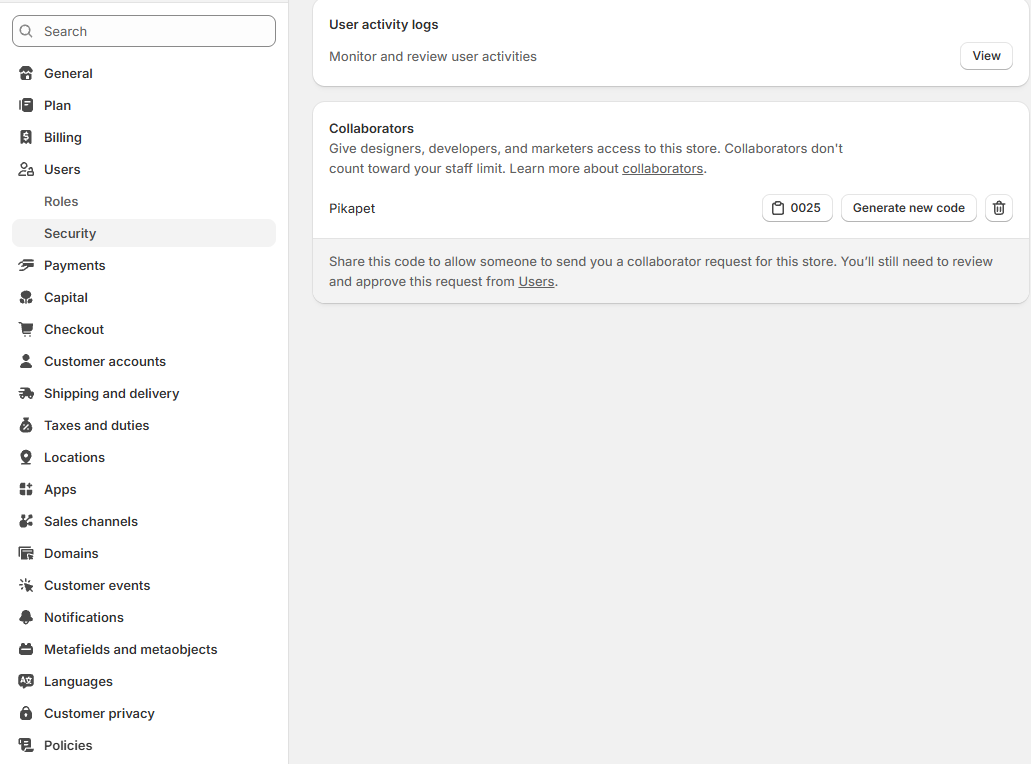
2. Find the collaborator code
In Shopify admin, open Settings, then Users, then Security. Scroll to Collaborators. Copy the four-digit code generated for your store.
3. Send the code on WhatsApp
Send only the four-digit collaborator code. Do not send your Shopify password, 2FA code, staff login, API key, card details, or customer export.
4. Approve the request
I use the code to request only the permissions needed for the agreed task. Review the request under Users and approve it when the permissions are correct.
5. Send the first task
Send the task, the relevant page or product URL, a screenshot or screen recording, and any deadline or acceptance criteria. I confirm scope and estimate before starting the timer.
6. Review the delivery summary
After the work and QA are complete, I send what changed, screenshots, time used, and remaining monthly time when relevant. You approve the preview before a sensitive change is published.
Have these ready
- Permanent myshopify.com store URL
- Four-digit Shopify collaborator code
- Task and relevant page or product
- Screenshot, screen recording, or clear description